Core
Work orders built for the bay
Create a job, assign a technician, add parts and log labour without leaving the page. Status updates reach the front desk the moment they happen.
Workshop management software, built for Australian service businesses
Connect jobs, customers, vehicles, parts, scheduling, quotes and invoices in one workshop management platform. The job sheet, the front desk and the invoice always agree.
14-day free trial · Full access · Set up in minutes
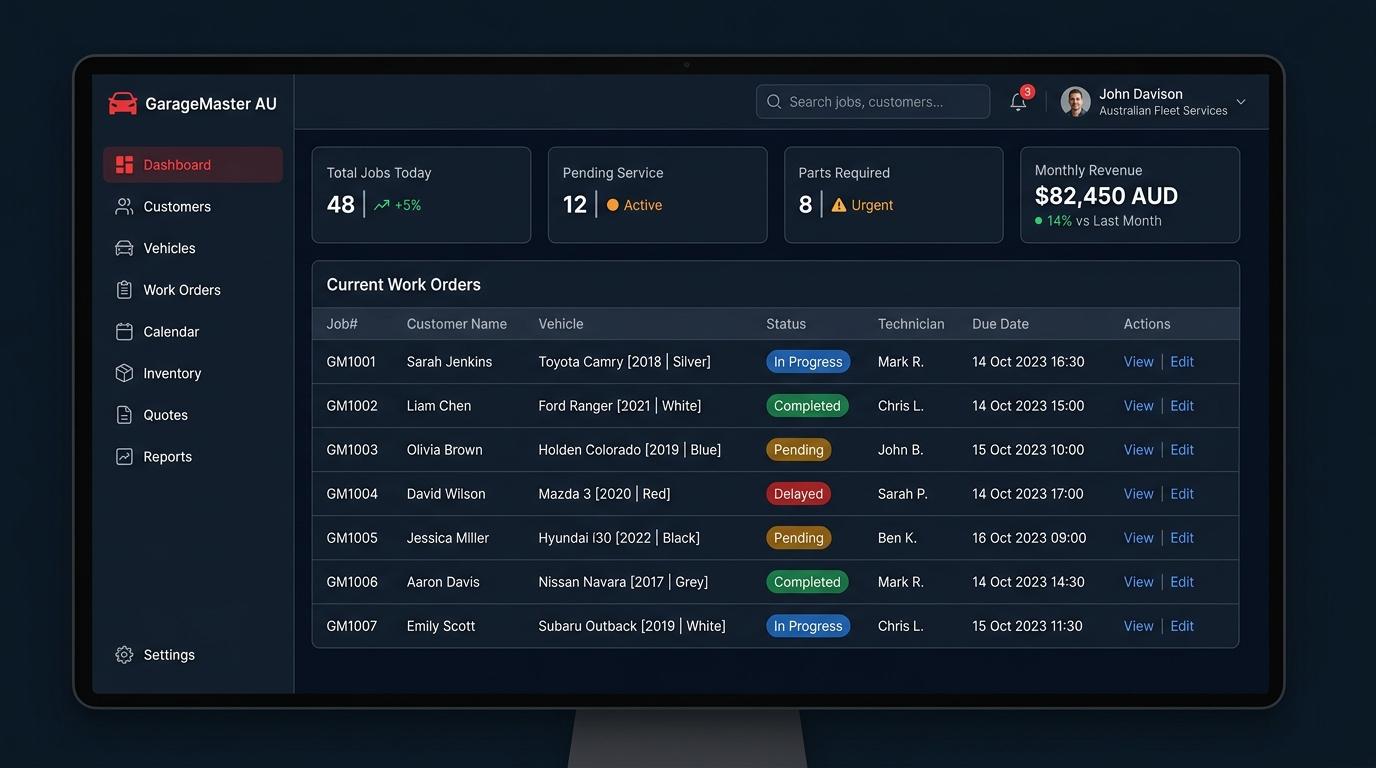
Everything a workshop needs in one connected system
The workshop problem
Writing the same job up twice — once on paper, once in the system — and still not being sure the front desk knows what the bay is doing.
Previous service notes in a different book, or a system that does not connect the customer to the car to the job to the invoice.
Not knowing whether the part is in the shed until the car is already apart. Then the job stalls and the customer is waiting.
Promising a car back on Thursday without knowing what else is booked. Then Thursday arrives and there are three jobs for two bays.
Ringing customers for approvals, leaving messages, waiting for call-backs — and the job sits in the bay while that happens.
Not knowing which jobs are profitable, which technicians are productive, or where the revenue is actually coming from.
The WRMS approach
From the moment a car arrives to the moment the invoice is paid, every piece of information lives in one place. No separate systems, no re-entry, no guessing.
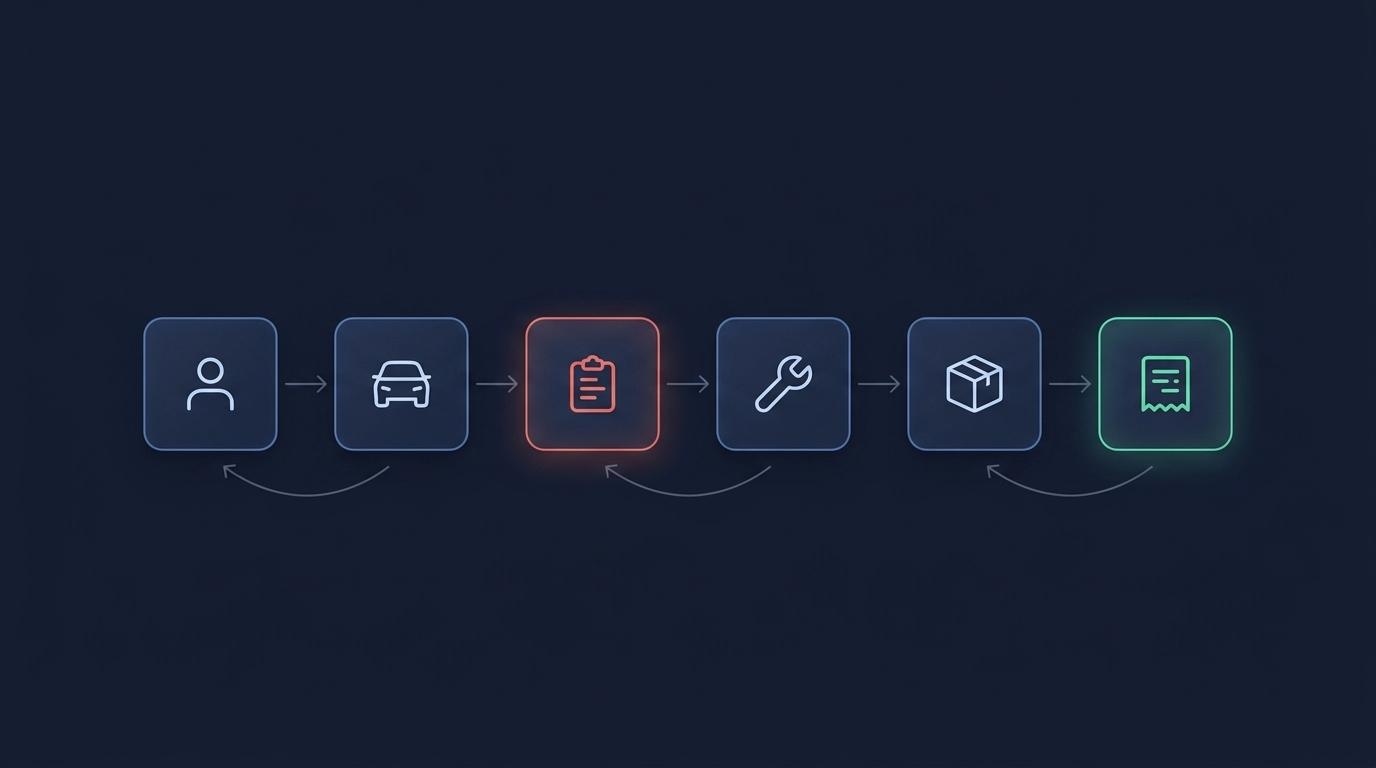
The work order connects the customer, the vehicle, the technician, the parts and the invoice. Nothing gets lost between them.
When a technician updates a job in the bay, the front desk sees it instantly. No phone calls, no shouting across the floor.
Parts connected to the job. Labour logged against the work order. Invoices that match what was done.
The complete workflow
Find or create the customer record in seconds
Full history, previous jobs and notes — all connected
Assign a technician, describe the job, set a due date
See bay capacity and book the right time slot
Technicians update from the floor as they work
Stock adjusts automatically, labour is logged to the job
Customer reviews and approves the quote from their phone
One click from completed job to customer invoice
What is inside
One source of truth per job, one record per vehicle, no second system to keep in step with the first.
Create a job, assign a technician, add parts and log labour without leaving the page. Status updates reach the front desk the moment they happen.
Every vehicle, every previous job and every invoice against the person who owns it. Find the full service history before the car is even off the hoist.
See bays, technicians and upcoming capacity on one screen. Know what is booked before you tell a customer when their car will be ready.
Drag jobs across status columns as work progresses. Every technician can see what is assigned, what is next, and what is waiting on parts.
Stock levels adjust as parts are consumed. Low-stock visibility before the job starts, not after the car is apart and the part is not in the shed.
Build a quote, send it for approval, complete the work, raise the invoice. One connected flow — no retyping, no version confusion.
Document the condition of every vehicle coming in. Capture findings, attach notes, and keep a record tied to the work order.
Customers approve quotes, follow job progress and access their documents from a link you send. No account to create, no app to install.
Revenue by period, job profitability, stock turnover and technician performance — the numbers a workshop owner actually needs.
Reach customers through the channel they actually use. Send job updates, appointment reminders and invoices directly from the platform.
Set service reminders and appointment follow-ups that send themselves. Keep vehicles returning without the manual follow-up.
Track seasonal tyre sets in storage, tied to the customer and vehicle. Know exactly what is in the rack and when it needs to go back on.
Customer experience
Send customers a link. They can approve quotes, follow job progress and access all their documents — without creating an account or installing an app.
Sarah Jenkins
2018 Toyota Camry · Silver
Quote #GM2847
Full brake service — front and rear pads, rotors resurfaced
Job status
Waiting for your approval
SMS
10¢ per message. Job updates and reminders.
Reach customers where they are.
Telegram
For customers who prefer Telegram.
Automated service reminders
Set reminders that send themselves when a service interval is coming up. Bring vehicles back without the manual follow-up.
Keep customers informed
Send job updates, appointment confirmations, invoice links and service reminders through SMS, WhatsApp or Telegram — all from inside WRMS.
SMS is billed at 10¢ per message. WhatsApp and Telegram notifications are included with your plan.
For workshop owners
Revenue by period, job profitability, technician efficiency, stock turnover — the numbers that tell you whether to hire, whether to buy, and where the money is going.
Revenue this month
$82,450
+14% vs last month
Jobs completed
284
+8 from last week
Average job value
$290
Up from $265
Parts in stock
1,240
8 items low
Your data, your choice
Most workshops run on our managed cloud. Some prefer to keep their database on their own infrastructure. WRMS supports both, and the application is identical either way.
WRMS hosts and maintains everything. Backups, updates and security are handled for you. Get started today without touching a server.
Run WRMS on your own infrastructure. The database stays in your building, under your control. Full-featured — nothing is removed.
Parts and procurement
Parts connect to the work order the moment they are consumed. Stock adjusts automatically. Supplier orders and purchase orders keep your shelves where they need to be.
Inventory — current stock
Oil Filter — OEM HF204
OIL-HF204
Brake Pads Front — Bosch BP1433
BRK-1433
Air Filter — K&N HA-2516
AIR-2516
Spark Plug — NGK ILFR6A
SPK-6A
Timing Belt — Gates T268
TIM-T268
Pricing
Every plan includes a 14-day free trial. Full access. Cancel anytime.
Starter
Independent mechanics and sole traders
Billed annually · $85/mo monthly
1 user included
Start free trialSmall
Small garages with a few bays
Billed annually · $115/mo monthly
3 users included
Start free trialTeam
Established workshops with a team
Billed annually · $150/mo monthly
6 users included
Start free trialLarge
High-volume service centres
Billed annually · $250/mo monthly
15 users included
Start free trial+$15/month per additional user · 10¢ per SMS · Save 20% with annual billing
Set up your workshop, import your customers and raise your first job today. 14-day free trial with full access.
14-day free trial · Full access · Cancel anytime