

Subscription and plans
Your free trial, the WRMS Pro plans, monthly or annual billing, extra users, changing plan and cancelling.
WRMS Pro is a paid subscription for each workshop, with a free trial to start. Everything on this page happens in Settings → Subscription.
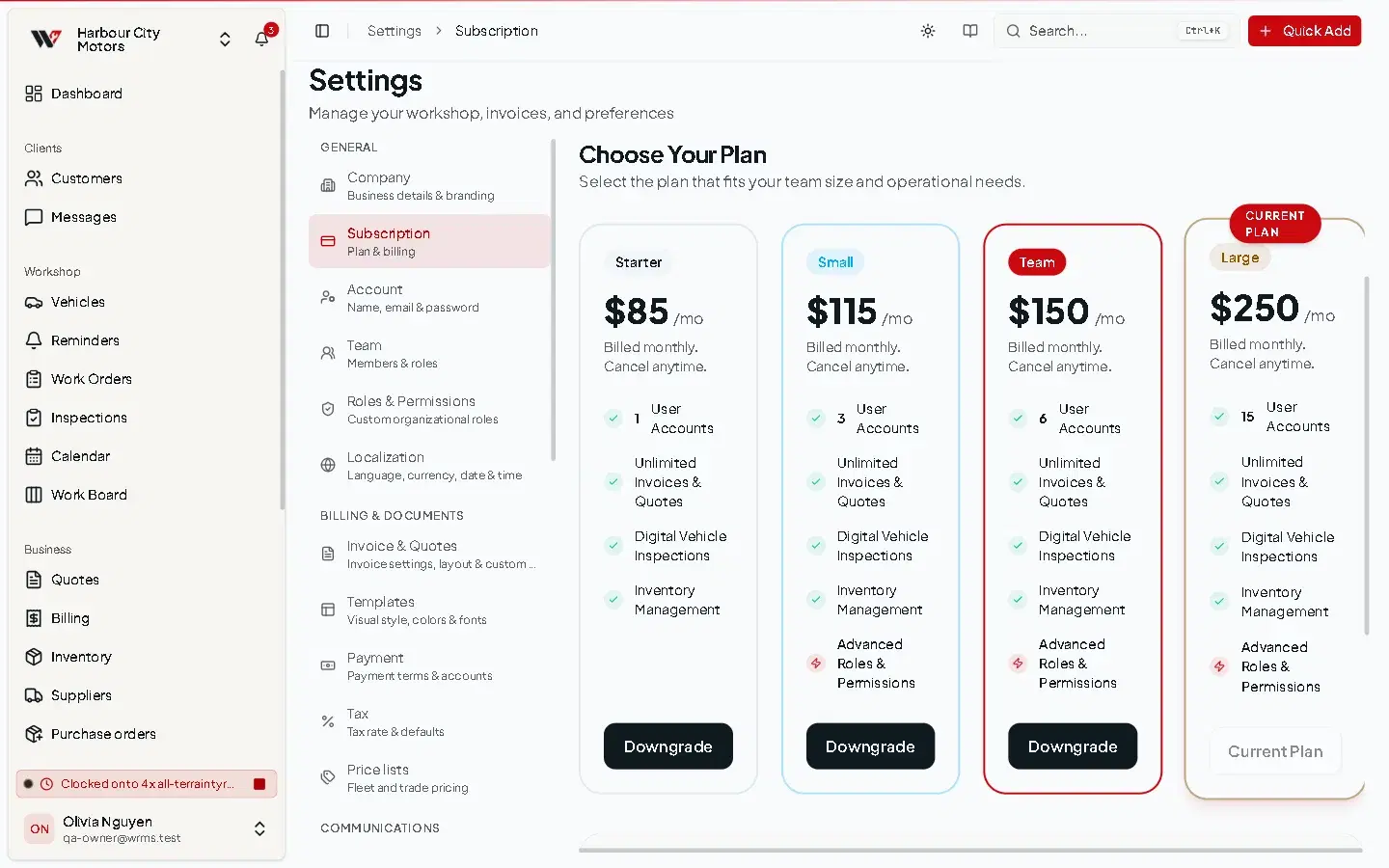
Free trial
A new workshop gets 14 days free with full access, and no card is needed to start. The badge at the top of the page says FREE TRIAL and shows the day the trial ends.
When you subscribe during the trial, you keep the days you have left: billing starts when the trial would have ended. If the trial has already ended, the subscription starts straight away. There is one trial per workshop.
If the trial ends without a subscription, the workshop is paused: you can still sign in and reach Settings → Subscription to subscribe, but the rest of WRMS Pro is locked until you do. Your data is kept.
Plans
Prices are in Australian dollars, per workshop.
| Plan | Monthly billing | Annual billing | Users included | Workshops |
|---|---|---|---|---|
| Starter | $85 a month | $816 a year ($68 a month) | 1 | 1 |
| Small | $115 a month | $1,104 a year ($92 a month) | 3 | 3 |
| Team | $150 a month | $1,440 a year ($120 a month) | 6 | 5 |
| Large | $250 a month | $2,400 a year ($200 a month) | 15 | 10 |
- Extra users cost $15 per user per month on any plan, on monthly or annual billing.
- Every paid plan includes the same features: SMS, WhatsApp and Telegram messaging, online payments, the customer portal, custom fields and templates, reports, webhooks, the AI assistant and the tyre hotel.
- Plans differ in how many users and workshops they allow, and in how many photos, diagnostic files and documents can be attached to each job: 30 of each on Starter and Small, 100 on Team and Large.
Subscribe
Change plan
When you already have a subscription, the plan buttons read Upgrade, Downgrade or, for your own plan on the other billing period, Switch billing. Your plan shows Current Plan.
Selecting a button opens Stripe's confirmation page, which shows the prorated amount before anything is charged. Confirm there to make the change. Your workshop never ends up with two subscriptions.
If the confirmation page does not open and you see a message saying the subscription cannot be bought again, contact support and we will change the plan for you.
Manage billing
- Manage Payment Methods & Invoices opens Stripe's billing page: update your card, download WRMS Pro invoices and receipts, and change billing details.
- Cancel Subscription cancels at the end of the current billing period. Until then the badge says CANCELLING and the date line says Access ends. Resume Subscription undoes the cancellation before that date.
- PAYMENT FAILED means a renewal payment did not go through. The workshop is paused until the payment succeeds, so update your card straight away with Manage Payment Methods & Invoices.
Who can manage the subscription
Owners and Admins, and Members whose custom role has Full admin access or Settings → Edit. Everyone else sees the plan but cannot change it.
This page is about paying for WRMS Pro. For charging your own customers, see Payments.
Still need help?
Email support@wrmspro.com or use the contact form. Signed-in users can also send a request from Settings → Support.